By
Just take a moment and notice one thing right now.
Notice the way you are sitting at the moment. Are your shoulders creeping up toward your ears? Is your spine curved like a C while your chin juts out toward your screen?
If that is the case, then you’re welcome to join the “shrimp club”.
Almost everyone who works on a computer falls into this sluggish posture without realizing it. In fact, let us talk about statistics for a while.
Did you know that up to 80.8% of office workers have reported musculoskeletal disorders, with 58.6% having neck pain and 52.5% having lower back pain? These have turned out to be the most frequent complaints (Mohammadian et al.,2025).
Now, you start the morning sitting tall. However, by lunchtime, you have slowly melted into your chair. While it might feel comfortable in the moment, this daily slouch puts massive strain on your neck, shoulders, and lower back.
There is still good news! You do not need a luxury ergonomic chair or extreme willpower to fix this. In fact, mastering the correct sitting posture at desk setup comes down to a few simple adjustments and smart habits.
Thus, in this guide, you will learn how to spot the hidden damage of the shrimp position, set up your workspace properly, and make easy fixes that keep your body pain-free all day long.
What Is The Shrimp Position And How Does It Affect You?
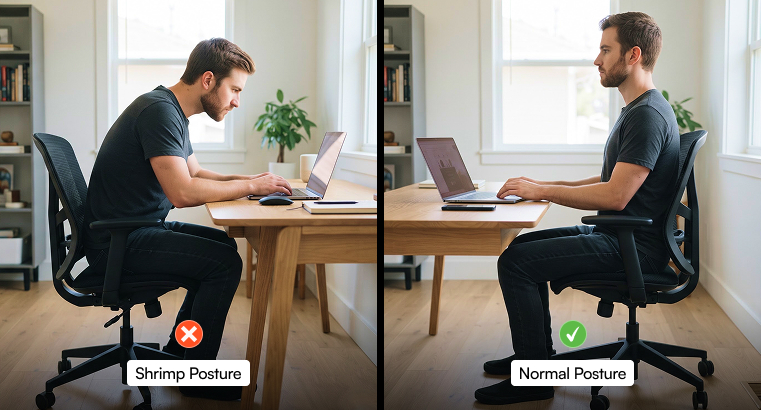
So, you might be searching “why does my back hurt” while quite obviously sitting like a shrimp. And now if it sounds familiar, you are definitely not alone.
Actually, the shrimp position is an internet nickname for that classic, C-shaped desk slouch. Here, you tend to do the following things:
- Pelvis tucks under
- Upper back rounds forward
- Head juts out toward your monitor
From the side, your spine mimics the curved shell of a shrimp. While it feels effortless when you are tired or deeply focused, this posture quietly works against your anatomy.
Let us understand why.
Your spine is built with natural S-shaped curves that absorb shock and support your body weight evenly. So, if you collapse into a C-shape, you would end up forcing your muscles and ligaments to work overtime just to hold you up.
The Effect This Has On You
Over time, spending hours in the shrimp position leads to several frustrating issues.
First of all, for each inch your head tilts forward, it places extra pounds of pressure on your cervical spine. As a result, this causes something known as “tech neck,” tight traps, and frequent tension headaches.
Following this, slumping tends to flatten the natural inward curve of your lumbar spine. As a result, this puts heavy pressure on your spinal discs and weakens the core muscles meant to support your torso.
Having a caved-in chest compresses your diaphragm while limiting lung expansion. So, taking in less oxygen makes you feel sluggish, foggy, and drained well before your workday ends.
Now, staying curled up for hours shortens your hip flexors and restricts healthy blood flow to your lower body. As a result, this leaves you stiff the moment you stand up.
The Shrimp Posture Vs. Upright Desk Posture
| Body Part | The “Shrimp” Posture (Avoid) | Upright Desk Posture (Aim For) |
| Head & Neck | Jutting forward toward the screen (“tech neck”) | Ears aligned directly over the shoulders |
| Shoulders | Rounded forward and hunched up toward ears | Relaxed, pulled slightly back, and down |
| Upper Back | Heavily curved into a “C” shape | Neutral, natural slight curve |
| Lower Back | Slumped with a gap behind the chair | Supported firmly against the backrest |
| Elbows & Wrists | Reaching forward; wrists bent upward | Bent at 90 degrees; wrists flat and neutral |
| Feet | Tucked under the chair, crossed, or dangling | Flat on the floor or on a footrest |
The Importance Of Office Ergonomics
If you have ever told yourself, “Today is the day I finally sit up straight,” only to catch yourself slouching twenty minutes later, do not blame your willpower.
In reality, you should blame your setup. That is because you cannot out-discipline a workspace that forces your body into awkward angles for eight hours a day.
Honestly, not even eight! Sometimes it is more than that.
And this is where office ergonomics comes in. Lambert (2024) has defined ergonomics as simply the science of fitting your workspace to your body, rather than forcing your body to contort to your workspace.
When your chair, desk, and screen are poorly positioned, slouching becomes the path of least resistance.
If your laptop sits flat on your desk, your neck has no choice but to tilt down. Conversely, if your chair lacks lower back support, your spine will naturally cave inward as your muscles tire out.
Achieve The Correct Sitting Posture At Desk: Core Rules To Follow
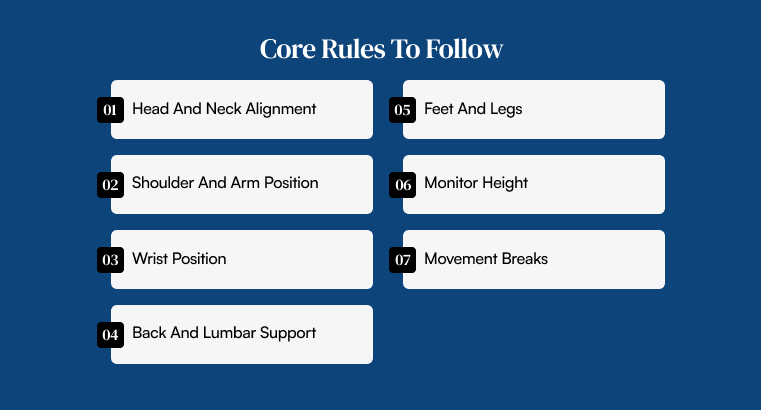
To maintain an upright desk posture, you have to rely on aligning your spine, relaxing your muscles, and matching your furniture to your body.
Head And Neck Alignment
Before anything else, try to keep your head balanced directly over your shoulders instead of just jutting forward toward the screen. Your ears should line up with your shoulders.
As a result, you can prevent unnecessary strain on your cervical spine and upper neck muscles.
Shoulder And Arm Position
Let your shoulders drop naturally away from your ears instead of hunching them up. Try to keep your upper arms close to your torso while bending your elbows at a comfortable 90 to 100-degree angle.
In this way, they can rest easily on your armrests or desk surface.
Wrist Position
When it comes to your wrists, try to keep them straight. Instead of bending them upward or downward while you are typing or using a mouse, try doing that.
Now, ensure that your forearms stay roughly parallel to the floor. That way, your hands float effortlessly over the keyboard without resting hard on the edge of the desk.
Back And Lumbar Support
Sit all the way back in your chair. In this manner, your lower back would press firmly against the backrest.
Use built-in lumbar support or a small cushion in order to maintain the natural inward curve of your lower spine and stop yourself from slouching.
Feet And Legs
Plant both feet flat on the floor with your knees bent at roughly a 90-degree angle. Now, keep them level with or slightly below your hips.
Avoid crossing your legs for long periods and use a footrest if your feet do not comfortably reach the ground.
Monitor Height
In the case of your screen, try to position your screen roughly an arm’s length away. In this way, you do not have to lean forward to read.
The top third of your monitor should sit at or just slightly below eye level. As a result, this allows you to view the screen without tilting your head up or down.
Movement Breaks
Here is the truth nobody talks about: even textbook-perfect posture becomes exhausting if you freeze in it for hours.
Your body is built to move, not to act like a statue. So, stand up, stretch your arms overhead, or take a quick two-minute walk every 30 to 60 minutes. That way, you would be able to wake up your circulation and hit reset.
Common Posture Mistakes To Stop
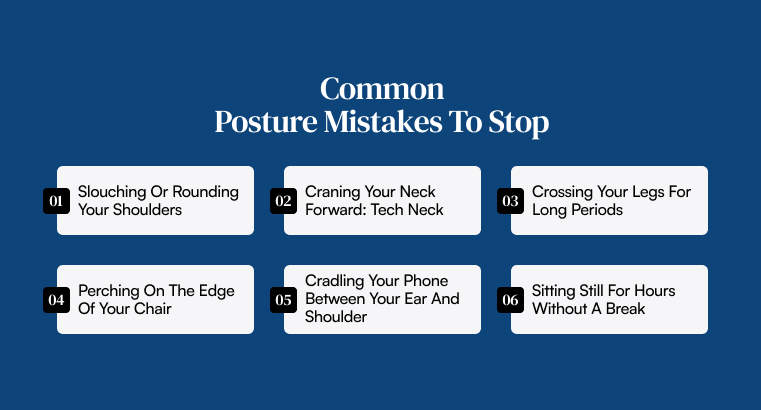
Even with the best intentions at 9:00 AM, old habits have a sneaky way of creeping back in once deadlines start piling up.
Catching these everyday posture traps before they turn into chronic pain can save your back from years of unnecessary wear and tear.
Slouching Or Rounding Your Shoulders
We have all been there. Just sinking deeper and deeper in our chairs as the afternoon tends to drag on.
Unfortunately, letting your shoulders round forward flattens your lower spine while tightening your chest. As a result, this leaves you feeling sluggish and stiff by the time you log off.
Craning Your Neck Forward: Tech Neck
The deeper you get into your work, the closer your face creeps toward the monitor. Does this sound familiar to you? This forward jut is often called “tech neck,” which piles massive extra weight onto your upper spine.
Thus, make it a habit to pull your head back while bringing the screen to you instead.
Crossing Your Legs For Long Periods
Crossing one leg over the other feels cozy for the first few minutes, right? Yet over time, that simple habit twists your pelvis out of alignment.
This ends up choking off healthy blood flow, silently setting you up for lower back twinges later in the evening.
Perching On The Edge Of Your Chair
When you are stressed or rushing through tasks, it is tempting to perch right on the front edge of your seat.
The problem is that sitting there abandons your backrest fully. As a result, this forces your lower back muscles to carry the full weight of your upper body until they burn out.
Cradling Your Phone Between Your Ear And Shoulder
Trying to multitask by pinching your phone against your shoulder while typing is a fast track to a knotted, painful neck.
Do yourself a favor and pop on a headset or hit speakerphone. That way, your neck will thank you tomorrow morning.
Sitting Still For Hours Without A Break
Getting locked into a “flow state” feels productive until you finally stand up and feel like you aged twenty years in one afternoon.
Never let hours slip by without moving. Rather than that, set a gentle timer so you remember to stand, breathe, and shake off the stiffness before it settles in.
Do Vs. Don’t: What To Actually Follow
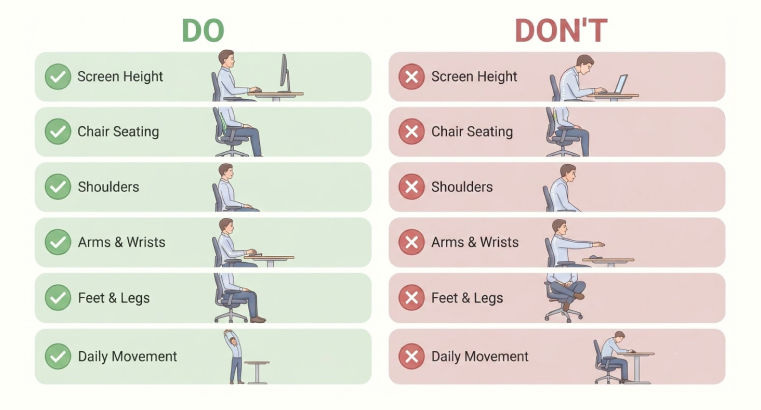
| Area / Habit | Do This (Correct Desk Posture) | Don’t Do This (The “Shrimp” Trap) |
| Screen Height | Keep the top third of your monitor at eye level, about an arm’s length away | Look down at a low laptop screen or lean your neck forward to read |
| Chair Seating | Sit all the way back so your hips and lower spine press firmly into the backrest | Perch on the front edge of your seat with a big gap behind your back |
| Shoulders | Let your shoulders drop naturally away from your ears and pull them gently back | Hunch your shoulders forward or round your upper back over the keyboard |
| Arms & Wrists | Keep elbows bent at a 90–100° angle close to your sides with flat, straight wrists | Reach far forward for your mouse or rest your wrists hard on sharp desk edges |
| Feet & Legs | Plant both feet flat on the floor (or a footrest) with knees bent at 90 degrees | Cross your legs, sit on one foot, or tuck your ankles back under the chair |
| Daily Movement | Stand up, stretch, or change positions for 2 minutes every 30 to 60 minutes | Stay locked in one stiff position for hours at a time, even a “perfect” one |
Quick Fixes To Implement To Stop Slouching
| Posture Problem | The Root Cause | Free / Low-Cost Quick Fix |
| Looking down at a laptop | Screen is too low | Stack 3–4 thick hardcover books under the laptop |
| Lower back ache | Lack of lumbar support | Place a tightly rolled bath towel behind your lower back |
| Dangling feet | Chair is too high for your height | Place a sturdy shoebox or ream of paper under your feet |
| Shrugged shoulders | Desk is too high | Raise your chair height and use a footrest to compensate |
| Leaning forward to read | Text is too small, or screen is far | Increase browser zoom to 110%–125% |
Your Best Posture Is Your Next Posture
Here is a secret most ergonomic guides forget to mention. There is no single “magic” sitting position that will save your back forever. Even if you line up your spine like a textbook diagram, freezing in that exact spot for hours will still leave you stiff, sore, and exhausted.
Additionally, your body simply was not built to act like a statue.
Instead of obsessing over sitting perfectly still, shift your focus to moving often. Every tiny adjustment you make gives overworked muscles a much-needed breather and wakes up tired joints.
So, try leaning back slightly into your chair during a long phone call. Afterward, try sitting upright again when it is time to type.
Give your legs a quick change of scenery by stretching them out in front of you for a minute before planting your feet flat on the floor again.
Better yet, build small resets into your day before stiffness even has a chance to settle in. Stand up every half hour to roll your shoulders back, reach toward the ceiling, or take a quick walk to refill your water glass.
Whenever you feel that familiar dull ache creeping into your lower back or neck, treat it as your body whispering for a change. Most importantly, listen before that whisper turns into real pain.
At the end of the day, great posture is never about rigid perfection. Instead, it is about giving your body the freedom to keep moving.
Disclaimer: The information provided in this article is for general informational purposes only. It does not, and is not intended to, constitute medical or health advice. Please consult a qualified healthcare professional for medical guidance or expert health assistance.
References
- Mohammadian, M., Mollahoseini, S., & Naghibzadeh-Tahami, A. (2025). Musculoskeletal disorders among office workers: Prevalence, ergonomic risk factors, and their interrelationships. Scientific Reports, 15(1), 45425. Scientific Reports.
- Lambert, T. (2024). How Workplace Ergonomics Can Make a Difference for Your Health and Productivity. Blog. NKC Health.
- Musto, J. (2026). Shrimp or tech neck? What your posture says about your health. Health & Families. Lifestyle. The Independent.
- Soares, C., Novais Shimano, S. G., Marcacine, P. R., & Rodrigues Martinho Fernandes, L. F. (2023). Ergonomic interventions for work in a sitting position: An integrative review. Revista Brasileira de Medicina do Trabalho, 21(1), e2023770. PubMed Central.
- NIH News in Health. (2017). Getting It Straight. Improve Your Posture for Better Health. NIH News in Health.
What is your reaction?